

How to Stream Football on YouTube and Twitch: Watchalong With a Live Match Tracker
You cannot show match video without rights, but a watchalong with a live tracker, score, and stats works. Step by step: a tracker page, OBS, YouTube and Twitch, avoiding bans, and monetization.
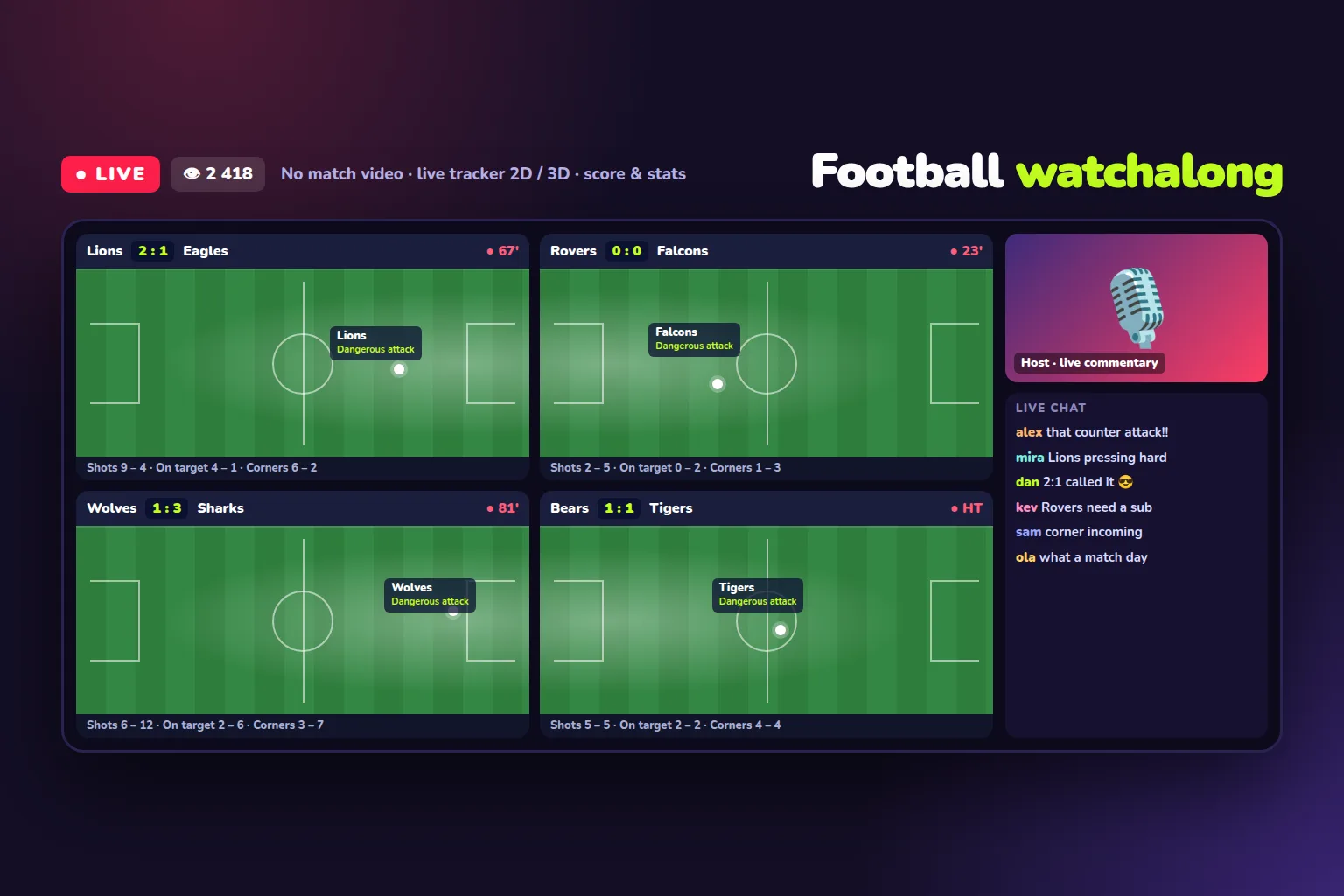
You can stream football matches on YouTube and Twitch — just not the video. A match broadcast without rights gets blocked within minutes, and the channel quickly collects strikes. The format that works is the watchalong: you watch the match together with your viewers, commentate, and talk in chat, while the screen shows a live match tracker in 2D or 3D with the score, attacks, shots, and statistics instead of video. SportAPI provides that tracker: from $50 a month per sport, 17 sports, and your own logo on screen. One stream can show a single match or a multi-view of 4–6 games, like a studio.
Below: why match video is off limits, what you can show, how to build the stream in OBS step by step, how to avoid bans, and how to make money from the channel.
Why match video is off limits
Match video rights belong to leagues and their broadcast partners. Platforms protect them automatically:
- YouTube compares stream video against rights holders’ reference files. A match means the stream gets interrupted or blocked, and rights holder claims turn into copyright strikes. Three strikes within 90 days and the channel is removed.
- Twitch takes streams down on rights holder complaints and suspends accounts for repeat infringement.
- Broadcast audio and TV graphics are protected content too. Removing the picture and keeping the TV commentary does not help.
Re-streams with mirroring, cropping, or frames do not save you: detection systems catch them, and the consequences for the channel are the same.
What you can show
A watchalong stream is built from things you own or are allowed to show:
| Stream element | Why it works |
|---|---|
| Your voice and camera | Commentary and analysis are your own content |
| A 2D or 3D live match tracker | A visualization of match data, not broadcast video |
| Score, clock, statistics | Attacks, shots, corners, cards in real time |
| Chat and viewer polls | Viewer predictions, votes, reactions to key moments |
| Your own design | Channel logo, frames, match grid |
The SportAPI live tracker shows how the game unfolds in real time: dangerous attacks, shots, possession, score, and clock. Viewers see where the ball is and what is happening — and listen to you, not to a TV commentator.
What you need
- The SportAPI Sports Odds API — you take the tracker ID for each live match from it (the
zpfield). From $30 a month per sport. - The SportAPI live 3D tracker — a 2D or 3D match visualization; the mode and logo are set up when you connect. From $50 a month per sport.
- Your own website or subdomain — the tracker key is bound to allowed domains, so the trackers live on your page.
- OBS Studio — free streaming software that puts the tracker page, your camera, and chat into one frame.
The tracker supports football, ice hockey, basketball, tennis, volleyball, handball, cricket, American football, Formula 1, horse racing, CS, and more — 17 sports in total. It works for live matches only: if a match has an empty zp field, there is no tracker for it.
Step 1. A tracker page: one match or a multi-view
Create a page on your domain, for example stream.your-site.com. The template below builds a tracker grid from the page URL: one match fills the screen, 2–4 matches form a 2×2 grid, and 5–6 matches go into three columns.
<!doctype html>
<html lang="en">
<head>
  <meta charset="utf-8">
  <title>Watchalong</title>
  <style>
    body { margin: 0; background: #0b1031; }
    .grid {
      display: grid;
      grid-template-columns: repeat(var(--cols), 1fr);
      grid-auto-rows: 1fr;
      gap: 12px;
      height: 100vh;
      padding: 12px;
      box-sizing: border-box;
    }
    iframe { width: 100%; height: 100%; border: 0; border-radius: 12px; }
  </style>
</head>
<body>
  <div class="grid" id="grid"></div>
  <script>
    // Page URL: https://stream.your-site.com/?games=745829876:1,746051530:1
    // 745829876 is the match zp value from the SportAPI line, 1 is the sport ID
    const KEY = 'pk_live_yourkey'; // tracker key bound to your domain
    const games = (new URLSearchParams(location.search).get('games') || '')
      .split(',')
      .filter(Boolean);
    const grid = document.getElementById('grid');
    grid.style.setProperty('--cols', games.length <= 1 ? 1 : games.length <= 4 ? 2 : 3);
    for (const game of games) {
      const [gameid, sport] = game.split(':');
      const frame = document.createElement('iframe');
      frame.src = `https://bet-embed-sport-tracker.vercel.app/?key=${KEY}&gameid=${gameid}&sport=${sport}&lang=en`;
      frame.title = 'Live tracker';
      grid.append(frame);
    }
  </script>
</body>
</html>
The page URL for four matches looks like this:
https://stream.your-site.com/?games=745829876:1,746051530:1,746051612:1,746051777:1Each pair is a match zp from the line and the sport ID. To change matches, just change the URL in OBS. How to get zp and how to switch matches without reloading is described in the tracker documentation.
Step 2. The OBS scene
- In OBS, create a scene and add a Browser source.
- Paste your tracker page URL, with width 1920 and height 1080.
- Add your camera and microphone — your commentary is the main content of the stream.
- Add a chat window and, if you like, your logo and a competition banner.
The tracker grid takes most of the frame, the camera goes in a corner, and chat in a side column. The result looks like a studio: viewers see every match of the round at once and hear your analysis.
Step 3. Going live on YouTube or Twitch
- YouTube: in YouTube Studio, create a live stream, copy the stream key, and paste it into the OBS stream settings with YouTube selected as the service.
- Twitch: copy the primary stream key from your creator dashboard and paste it into OBS with Twitch selected as the service.
Before the first broadcast, run a private test stream: check that the trackers load, the audio works, and the on-screen text is readable on a phone.
How to avoid bans
- An honest title. “Watchalong: Real Madrid vs Barcelona, live tracker and analysis” — good. “Real Madrid vs Barcelona live stream HD free” — misleading viewers, which platforms punish separately even when there is no video in the stream.
- An honest description. State that the stream shows no match video: only the tracker, statistics, and commentary.
- No league or club logos. Crests and trademarks belong to rights holders — use team names as text and your own design.
- No broadcast frames in the thumbnail. The stream thumbnail is your design, not a still from the TV feed.
- No links to pirate streams. Not in the description, not in chat.
Platform rules change, so read the current version before you launch the channel. This article is a practical guide, not legal advice.
How to make money from a watchalong channel
- Ads and the platform partner program. Once the channel meets YouTube or Twitch requirements, streams start earning ad revenue.
- Donations, paid messages, and subscriptions. In a watchalong, viewers are most active in chat during the match — the best moment for channel support.
- Sponsors. Sports brands and services readily buy integrations in streams with a live audience.
- Your own Telegram channel and website. The stream brings the audience, and a Telegram channel on autopilot keeps it between broadcasts.
- Bookmaker affiliate programs. Only operators licensed for your audience’s country, following that country’s advertising rules, with an 18+ label.
What it costs
| What you need | Cost |
|---|---|
| Live 3D tracker for one sport, 2D and 3D modes | from $50 a month |
| The sports line for the same sport — for match IDs | from $30 a month |
| OBS Studio | Free |
| Testing before you pay | 2-day line trial; tracker trial terms from the manager |
FAQ
Can I stream football matches on YouTube?
Match video without rights — no: the stream gets blocked and the channel collects strikes. You can run a watchalong — your commentary plus a live tracker with score and statistics, without broadcast video.
What is a watchalong?
A stream format where the host watches a match together with viewers: commentating, answering chat, and running polls. There is no match video on screen — a tracker and statistics take its place.
Can I show several matches at once?
Yes. The page in this article builds a grid of 2–6 trackers. It is handy on days with several matches in a round.
Is there a tracker for ice hockey, tennis, and esports?
Yes. The tracker supports 17 sports, including ice hockey, basketball, tennis, volleyball, cricket, and CS. The set depends on your plan.
Can I add my own logo?
Yes. The logo is added when you connect the tracker — send the file to the manager. Deeper design changes are done as a separate project.
What to do today
- Decide which matches and sports your channel will cover.
- Message the SportAPI manager: you need the line and the tracker for your domain.
- Publish the tracker page on your domain.
- Build the OBS scene: trackers, camera, chat.
- Run a private test stream and launch your first watchalong.
Message the SportAPI manager on Telegram with the sports your channel needs — you will get access to the Sports Odds API and can connect the live tracker to your stream.