

Sportsbook API Integration in 7 Days: What the Developer Does Each Day
A day-by-day plan for one developer: menu and events on day 1, markets on day 2, live on day 3, bets on day 4, settlement on day 5, cache and security on day 6, a launch checklist on day 7.
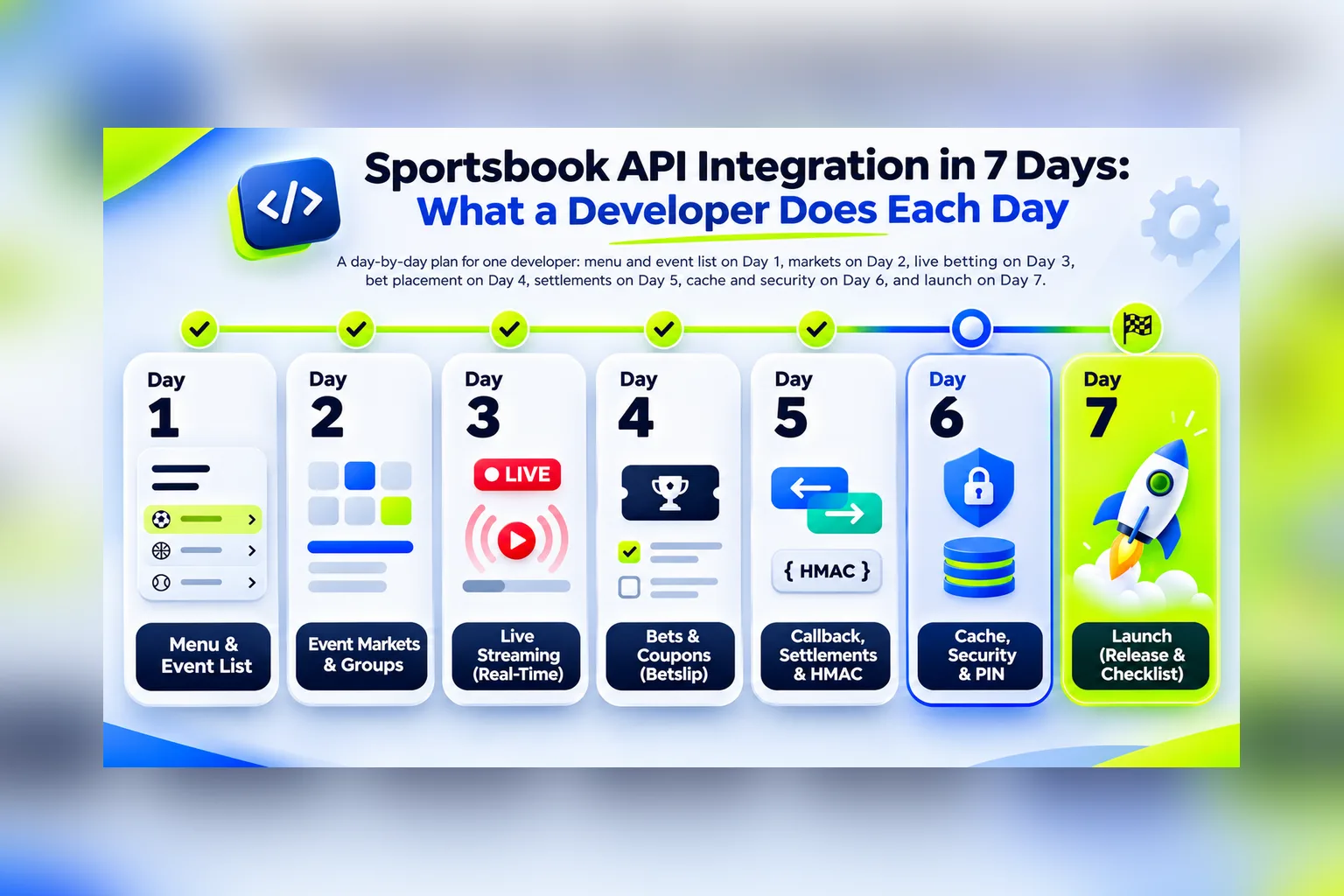
One developer can finish a sportsbook API integration in seven working days: the odds feed, bet placement and settlement, with a backend that keeps the API key away from the browser. The trick is to split the work by days and end each day with something you can check on a real match. Below is that split, with the requests, the code and the check for every day.
If you only need odds on your site and don’t accept bets, you need day 0 to day 3 plus day 6. That’s four working days. Days 4 and 5 add the bet slip and settlement through the Coupon API.
For scale: with the ready examples, the first screen with real events takes about 20 minutes. A team that already knows betting systems does the full cycle in about five days, while a team new to the domain can spend a month. Seven days is the realistic middle for one developer who hasn’t worked with a sportsbook feed before but reads the documentation. The plan below is for Sport Line API, the SportAPI odds feed, and the Coupon API, but most of the steps apply to any provider that gives you a line and takes bets through JSON.
Why an integration drags on for months
Rarely because of the API itself. The time goes into decisions nobody made at the start:
| What eats the time | What happens | What the plan does instead |
|---|---|---|
| No order of work | The developer explores the API instead of building the product | One screen per day, in the order players use them |
| Calls from the browser | The key leaks, the integration is rewritten through a backend | A backend proxy from day 1 |
| A fixed list of sports and markets | A tournament disappears from the line and the page breaks | Only current IDs from menu, markets as the API returns them |
| Prematch and live linked by ID | ”Ghost” matches that never go live | Separate prematch and live storage from day 3 |
| Home-made settlement | Weeks on Asian handicaps, cancellations and resettlement | Results come from the API, your code only pays |
| Polling at any rate | HTTP 429 and blocked outcomes nobody noticed | Intervals from the documentation, one poller for all players |
| HTTP 200 treated as success | Rejected coupons saved as accepted | Three checks on every bet: HTTP status, code, error_code |
Each of these costs a day to fix in the plan and a month to fix after launch.
Day 0. What to get from the manager
This is half a day, and most of it is waiting for messages. Write to the SportAPI manager on Telegram and get:
- For the odds feed: the API base URL and the key. The key goes into the
PackageHTTP header of every request. Confirm which sports and languages your key covers. - Server addresses. A key can be restricted to your server IPs or sites. Send the IP of the machine that will make the requests, otherwise you’ll get
Access from IP … is not allowed for this Package. - For bets: the Coupon API base URL, a login and password for the partner account, and, if you want callbacks, the
callback_secretthe manager creates for you.
The free key lasts two days and includes all sports, prematch and live. That’s enough for days 1 and 2. From day 3 you’ll be on a paid plan, from $30 a month for one sport, so pick the sport you’ll launch with. Bet placement and settlement, the Coupon API, start at $300 a month.
Check the key before you write any code:
curl 'https://YOUR_API_DOMAIN/v1/account' --header 'Package: YOUR_API_KEY'The account method returns the key’s terms, sports, languages, restrictions, the address you’re calling from in your_ip, and your request counts for the last 7 days. It’s the first thing to look at when something stops working later.
Day 1. The menu and the first screen with events
Two requests give you a working list of matches. The menu returns the current hierarchy of sports, countries and tournaments in one call, and events returns the matches of a sport with their main odds:
GET /v1/menu/live/en
GET /v1/events/1/0/sub/50/live/en
Here 1 is football, 0 means all tournaments of the sport, sub/50 is the required format (the API returns all events in the scope regardless of the number), live is the line type and en is the language. The response is grouped by tournament: body[] holds tournaments, each with an events_list[], and each event has game_id, opp_1_name, opp_2_name, game_start as a Unix timestamp, score_full, period_name, timer in seconds and game_oc_list with the main markets.
The code that matters on day 1 is the backend proxy. It’s the only place in your system that knows the key, and it serves one cached copy of the line to every player:
// server/line.js: the only module that talks to Sport Line API
const API = process.env.SPORTAPI_BASE_URL; // the API domain the manager issued with the key
const KEY = process.env.SPORTAPI_KEY; // never sent to the browser

const cache = new Map();    // path -> { at, body }
const inflight = new Map(); // path -> Promise, so requests never overlap

export async function fetchLine(path, ttlMs) {
  const hit = cache.get(path);
  if (hit && Date.now() - hit.at < ttlMs) return hit.body;
  if (inflight.has(path)) return inflight.get(path);

  const request = (async () => {
    const res = await fetch(`${API}${path}`, { headers: { Package: KEY } });
    const data = await res.json();
    if (!res.ok || data.error_code) {
      const err = new Error(data.error_message || `HTTP ${res.status}`);
      err.status = res.status;
      throw err;
    }
    cache.set(path, { at: Date.now(), body: data.body });
    return data.body;
  })().finally(() => inflight.delete(path));

  inflight.set(path, request);
  return request;
}

// routes the front end calls; TTLs are the minimum intervals from the docs
app.get('/api/menu/:type', async (req, res) => {
  const ttl = req.params.type === 'live' ? 20_000 : 60_000;
  res.json(await fetchLine(`/v1/menu/${req.params.type}/en`, ttl));
});

app.get('/api/events/:type/:sportId', async (req, res) => {
  const { type, sportId } = req.params;
  const ttl = type === 'live' ? 7_000 : 30_000;
  res.json(await fetchLine(`/v1/events/${sportId}/0/sub/50/${type}/en`, ttl));
});
Two things in this snippet save you days later. The inflight map means a slow response never piles up duplicate requests for the same data. The cache means a thousand players on the live page produce one request to the API every 7 seconds, not a thousand.
Team logos, flags and sport icons are served ready-made by ID, so you don’t need to host images. The address templates come with the integration guide; for a team you insert opp_1_icon without its file extension.
Check at the end of day 1: the list of live matches renders with scores, the timer counts up locally between requests (the API returns timer in seconds, you divide by 60 and keep counting on the client), and the main odds show up for each match. Don’t call menu as often as events: 20 seconds for live and 60 for prematch is the minimum.
Day 2. The match page and markets
The full list of markets for one match comes from event in group format:
GET /v1/event/{gameId}/group/live/enThe API has already done the layout work: game_oc_list[] holds markets, each market’s oc_list[] holds columns, and each column holds selections. The columns field is the recommended number of columns for the interface. Keep the order of markets, columns and selections as the API returns them. Don’t resort them and don’t build the page around a fixed set of market names, because basketball usually has no draw and tennis never does.
// body.game_oc_list: markets -> columns -> selections
function marketsForPage(game) {
  return game.game_oc_list.map((market) => ({
    id: market.group_id,        // use for logic
    name: market.group_name,    // use for display, depends on the language
    columns: market.oc_list.map((column) =>
      column.map((oc) => ({
        name: oc.oc_name,
        size: oc.oc_size,                       // total or handicap value
        rate: oc.oc_block ? null : oc.oc_rate,  // blocked: no button
        pointer: oc.oc_pointer,                 // goes into the bet slip untouched
      })),
    ),
  }));
}
The fields a bet slip needs are oc_rate, the current odds, oc_size, the total or handicap value, oc_pointer, the selection ID you’ll later send to the Coupon API, and oc_block. A blocked selection stays in the response so the page doesn’t jump, but it must have no button.
Halves, corners, cards and other sub-events are listed in sub_games[] of the main match. Each has its own game_id, and its odds come from a separate event request with that ID. The response then contains only that sub-event’s markets. For screens that don’t show odds, such as a schedule, add ?odds=false: the response is 2 to 5 times smaller.
Check at the end of day 2: open any live match on your page and in the raw API response side by side. Same markets, same order, same odds, and every oc_block: true selection is disabled on your page.
Day 3. Live: polling, intervals and “Game id finished”
Sport Line API is REST, so your server asks for a fresh snapshot at an interval. WebSocket is still in development, so plan on polling. The minimum intervals are in the data update guidelines:
| Method | Live | Prematch |
|---|---|---|
menu | 20 s | 60 s |
events (match list) | 7 s | 30 s |
event (one match) | 5 s | 30 s |
Three rules make live stable. Request event only for matches someone has open, not for every match in the list. Don’t start a request while the previous one for the same data is still running. And after an error, wait longer before trying again: 5, 10, 20, 40 seconds, then back to normal once a response succeeds.
// one loop per open match; stops when the match leaves the line
async function pollEvent(gameId, onUpdate, onGone) {
  let delay = 5_000; // event, live: 5 s minimum
  for (;;) {
    try {
      const body = await fetchLine(`/v1/event/${gameId}/group/live/en`, 5_000);
      if (body.message === 'Game id finished') return onGone(gameId);
      onUpdate(body);
      delay = 5_000;
    } catch (err) {
      if (err.status === 404) return onGone(gameId); // Game not found: stop
      delay = Math.min(delay * 2, 40_000);           // 5 -> 10 -> 20 -> 40 s
    }
    await new Promise((resolve) => setTimeout(resolve, delay));
  }
}
The part that surprises every first integration: when a match moves from prematch to live, it gets a new game_id. The two IDs are not linked, and there’s no status that says “this prematch match has started”. So store prematch and live separately, take the live list from events with the live type, and don’t try to match them by ID.
When a match leaves the line, event for the old ID returns Game id finished with HTTP 200. It doesn’t tell you why: the match may have gone live under a new ID, been cancelled or disappeared from the line. Stop polling that ID, refresh the menu and the event list, and don’t use this message to decide whether the match ended.
Live matches also carry stat_list with the key statistics for the sport, zp for the ready-made match tracker widget and va / vi for video. None of them are needed on day 3, but they’re free data for later. How the data travels from the feed to the player’s screen, with latency at each step, is in our live data pipeline article.
Check at the end of day 3: open a live match, watch the score and the odds change on your page within a few seconds of the API response, pull the network cable for a minute and watch the delays grow and then recover. Then wait for a match to finish and confirm the loop stops.
Day 4. The bet slip and placement
From here on you work with the Coupon API, the bet placement and settlement service. It has its own base URL and its own auth: POST /api/partner/login with your login and password returns a JWT that goes into the Authorization: Bearer header. When a request returns HTTP 401, log in again.
A bet is a pointer built from what the player saw on day 2. Take oc_pointer from the line unchanged, prefix it with the line type and append the odds:
line_type#oc_pointer#oc_rate
line#123456789|1|3|0#1.4
If the selection has a player ID in op_id, append it as one more # segment. Then place the coupon:
// POST /api/bets: the bet slip sends what the player saw
app.post('/api/bets', requireUser, async (req, res) => {
  const { type, pointer, rate, amount } = req.body;
  const listBets = [`${type}#${pointer}#${rate}`];
  await wallet.reserve(req.user.id, amount); // balances live in your system

  const r = await fetch(`${COUPON_API}/api/partner/coupons/place`, {
    method: 'POST',
    headers: {
      Authorization: `Bearer ${await partnerToken()}`,
      'Content-Type': 'application/json',
    },
    body: JSON.stringify({
      list_bets: listBets,
      amount,
      currency: 'USD',
      lang: 'en',
      mode: 'reject', // odds changed: refuse and show the new price
      callback_url: process.env.COUPON_CALLBACK_URL,
    }),
  });
  const data = await r.json();

  // three checks, in this order: HTTP status, code, error_code
  if (!r.ok || data.code !== 1) {
    await wallet.release(req.user.id, amount);
    return res.status(409).json({
      error: data.error_code,             // 501: odds changed, 503: blocked
      changes: data.body?.changes ?? [],  // the new odds for 501-504
    });
  }

  for (const coupon of data.body.coupons) {
    await bets.save(req.user.id, coupon.coupon_code, coupon); // code is a string
  }
  res.json({ coupons: data.body.coupons.map((c) => c.coupon_code) });
});
What the rejections mean and what the slip should show:
| Code | Reason | Show the player |
|---|---|---|
501 | The odds changed | The new odds from body.changes[] and a button to accept them |
502 | The outcome is no longer available | Remove it from the slip |
503 | The outcome is blocked | ”Temporarily unavailable”, keep it in the slip |
504 | Verification error | ”Try again in a moment”; don’t mark the bet as placed |
506 | Two bets from one match in an accumulator | ”Only one bet per match in an accumulator” |
507 | Insufficient partner balance | Nothing player-facing; alert your own team |
If you’d rather accept changed odds automatically, send mode: 'accept' with mode_type: 1 for increases only, 2 for decreases only, 3 for any change. The usual default is reject with a toggle for the player. An accumulator is the same request with several pointers and multi: false; it holds up to 15 legs and can’t contain two bets on the same match, including its halves and corners.
Two rules that prevent money bugs. A business error arrives with HTTP 200 and code: 0, so a check on the HTTP status alone saves rejected coupons as placed. And a timed-out place request must not be retried blindly: the first one may have gone through, and a retry creates a duplicate. Query the coupon or your own records first.
Check at the end of day 4: place a single and an accumulator on the test balance, see them in GET /api/partner/coupons/active, then place a bet on a live match while the odds are moving and watch the 501 path show the new price.
Day 5. Settlement: the callback and the polling fallback
You don’t write settlement logic. After the match the Coupon API settles every bet in the coupon, main markets, halves, corners, Asian lines, and sends the result to your callback_url with an HMAC signature. How the settlement itself works, which markets it covers and how fast, is in our article on automated bet settlement; the callback handler with the signature check is there too. Today’s work is wiring it in correctly.
Rules the handler must follow:
- Compute
sha256=<hex HMAC-SHA256>over the raw request body, before JSON parsing, withcallback_secret, and compare it with theX-Coupon-Signatureheader in constant time. - Store
batchIdwith a unique index. The same batch may be delivered again, and a repeatedbatchIdmust not pay twice. - Process every coupon in the batch, up to 100 per callback, and reply HTTP 200 only after all of them are saved. The API retries on timeouts and on 500, 502, 503 and 504: immediately, then after 1, 5, 15 and 60 minutes, five sends at most.
- Pay from
realWinonly. Coupon status2is a win,4a loss,8a full refund,15means a recalculation is coming: if you already paid, debit the stake again, wait for the new final status and pay the newrealWin. - One
coupon_codecan arrive in different batches during progressive settlement and resettlement. Make the payout function idempotent per coupon and batch.
A callback can be lost while your server is down, so the same day you add polling. Every few minutes, ask for coupons settled recently and run them through the same idempotent function:
// every 5 minutes: catch up on coupons settled in the last 10 minutes
setInterval(async () => {
  const r = await fetch(`${COUPON_API}/api/partner/coupons/calculated?time=10`, {
    headers: { Authorization: `Bearer ${await partnerToken()}` },
  });
  const data = await r.json();
  for (const coupon of data.body ?? []) {
    // the same function the callback handler calls; a second run changes nothing
    await bets.applyResult(coupon.coupon_code, coupon.status, coupon.real_win);
  }
}, 5 * 60 * 1000);
The calculated method looks back at most 120 minutes. After a longer outage, use POST /api/partner/coupons/results with your saved coupon codes, up to 100 per request, or with a creation period of up to 24 hours. Note the field names: the callback sends realWin, the full coupon model sends real_win.
Check at the end of day 5: settle a test coupon, replay the same callback body twice and confirm the balance changed once. Stop your callback endpoint for an hour, place and settle a bet, start the endpoint again, and confirm polling delivered the result.
Day 6. Cache, load and security
Day 6 has no new endpoints. It’s the day you make the integration survive a Saturday evening.
| Rule | Why |
|---|---|
| One poller per data set, many players read from your cache | The line is the same for everyone; a request per player is wasted and hits the limit |
| Stay under 50 requests per second on average, 100 in a burst | Above that the API returns HTTP 429 with a Retry-After header; wait that many seconds |
Honour Retry-After on 503 as well | search and event for a match not yet in memory return 503 while the source loads |
The key, the partner password, the JWT and callback_secret live only on the server | A key in browser JavaScript or a mobile app is a key anyone can use; the JWT must not appear in URLs or full in logs |
Money as decimals, coupon_code as a string | Floats drift; coupon codes have 12 digits and can start with zeros |
| Callback over HTTPS in production | HTTP is allowed for test environments only |
Log every failed request with the URL without the key, the time, the HTTP status and error_code | That’s exactly what support asks for, and it cuts a day of back-and-forth |
If you cache event responses for 5 seconds and events for 7, even a few thousand concurrent players stay far below the limit. The limit is per key, and the manager can change it by agreement, but a correctly cached integration never reaches it.
Check at the end of day 6: run a load test against your own endpoints, not the API, and count the outgoing requests. The number shouldn’t change when you add virtual players.
Day 7. The launch checklist
Before switching from the test key to a production plan, go through the list. Each item is a place where integrations break:
- The API key, the partner credentials and
callback_secretare not in the front-end bundle, the repository or the logs. menu,eventsandeventare requested at or below the documented intervals.- Requests for the same data don’t overlap.
- Prematch and live are stored separately and never linked by
game_id. Game id finishedstops polling and refreshes the list.- Markets render in the order the API returns them, and
oc_block: trueselections have no button. - The timer counts locally and resyncs on every response.
- A bet is saved as placed only after HTTP 200,
code: 1and a coupon inbody.coupons. 501shows the new odds;503says the outcome is temporarily unavailable.- A timed-out
placerequest is checked, not retried blindly. - The callback signature is verified over the raw bytes.
- A repeated
batchIdchanges nothing. - Payouts use
realWinorreal_win, neverpotential_win. - Coupon status
15is handled: stake back, wait for the new result. - Polling restores results after an hour of downtime.
When all 15 pass on the trial key, tell the manager which plan you’re starting with, swap the key in the configuration and don’t change anything else. The requests are the same.
The whole week on one page
| Day | What’s built | How to check it |
|---|---|---|
| 0 | Keys, base URLs, allowed IPs | account returns your terms and your_ip |
| 1 | Backend proxy with cache, list of matches | Scores and odds on the page, one API request per interval |
| 2 | Match page with all markets and sub-events | Same markets and odds as the raw response, blocked ones disabled |
| 3 | Live polling, backoff, prematch and live kept apart | Odds move within seconds, loop stops when the match ends |
| 4 | Bet slip, pointers, placement, rejection codes | A single, an accumulator and a 501 on a live match |
| 5 | Settlement callback and polling fallback | Replayed callback pays once; polling restores after downtime |
| 6 | Cache, rate limits, secrets, logs | Outgoing requests don’t grow with players |
| 7 | Launch checklist, production key | All 15 items pass |
Seven mistakes that cost the most time
- Calling the API from the browser or the app. The key is restricted to your server addresses and must stay there. The rewrite through a backend costs more than doing it on day 1.
- Hard-coding sports, tournaments or market names. The line changes every hour. A tournament with no events disappears from
menu, and a sport without matches disappears too. - One polling loop per player. Ten players, ten identical requests. The limit arrives on the first busy evening.
- Polling
eventfor every match in the list. You only need details for matches someone has open. - Requesting the API every second to update the timer. Count locally, resync on the next response.
- Treating HTTP 200 as “bet accepted”. Check
codeanderror_codetoo. - Retrying a timed-out bet. It may already exist. Look it up first.
What makes the week shorter
Most of the seven days go into reading and checking, not typing. These SportAPI tools cut that part:
- The integration guide walks the same
menu → events → eventsequence with every field explained, and the quick integration guide for the Coupon API fits bet placement and settlement on one page. - Real JSON responses for every method are in the documentation, so you can build the front end before the key arrives.
- The Python client installs with
pip install sportapiand covers sync and async requests with typed models and a demo mode. - The OpenAPI specification with a Postman collection and a mock server lets you generate a client in any language.
- Documentation written for AI coding agents, plus an MCP server for Claude, Cursor and VS Code. With an agent reading that documentation, our own team built the full cycle, odds, bets and settlement, in one day.
If there’s no developer at all, the same line and bet slip come as a ready sportsbook widget that you embed in a page: the week turns into an afternoon, at the cost of a fixed interface.
FAQ
Can one developer really do the whole integration?
Yes, if the plan is followed in order and the developer owns the backend. The feed and the Coupon API are plain HTTPS and JSON; the hard parts are discipline about intervals, IDs and idempotency, not the volume of code. A second developer helps mostly on the front end.
Do I have to use the Coupon API to accept bets?
No. Many projects take the odds feed only and run bets in their own system, or show odds without bets at all. In that case the plan ends after day 3 and day 6. The Coupon API is for teams that don’t want to build and maintain settlement.
Which programming language should I use?
Any language that sends HTTPS requests and parses JSON. The examples here are Node.js; the documentation has the same flow in cURL, Python, PHP and JavaScript, and there’s an official Python client.
Is there a WebSocket or push feed?
Not yet. WebSocket support is in development, so a production integration polls at the documented intervals. With caching on your side, polling serves thousands of players without touching the limit.
How do I move from another odds provider?
Run SportAPI in parallel on the trial key, map your sports and markets to group_id values from the feed, and switch the front end once the line matches. Bets placed with the old provider are settled there; new coupons go through the Coupon API.
What does the API cost once the week is over?
The odds feed is from $30 a month for one sport, prematch and live included. Bet placement and settlement through the Coupon API is from $300 a month. Prices are in the plans on the product pages; the manager confirms them before you switch keys.
Start day 1 today
The first screen with real matches is about 20 minutes away from the moment you have the key. Ask the SportAPI manager on Telegram for a test key, point the proxy from day 1 at your base URL and run the account request. Everything else in this plan builds on that first response.